
How to Choose Trust Center Software for Enterprise Reviews
Between a buyer's yes and a signed contract, there's usually a security review. The buyer's security team wants to see how you'll protect their data, and the requests land with your GRC team, often asking for answers it's already given another buyer that quarter.
A trust center, the portal where buyers find your security material, lets buyers find most of that without asking, as long as what it shows matches your controls and policies today. For a few reviews a quarter, sharing documents by hand can work. Above that, a standalone trust center suits teams whose controls and policies aren't held in one platform, and a trust center inside your compliance or GRC platform suits teams whose program already runs there.
The review itself tends to ask for the same few things: your reports, certifications, and policies, and answers to the buyer's own questions, usually sent as a questionnaire. Some of that you'd hand to anyone, and some you'd only share once you know who's reading it. A trust center holds what you choose to publish and controls who sees the rest.
Why do Enterprise buyers review your security before and after the deal?
Enterprise buyers review suppliers because third parties are involved in a growing share of breaches. A second reason is NIST's Cybersecurity Framework 2.0, which asks organizations to check suppliers before the contract and monitor supplier risk over the course of the relationship.
Verizon's 2026 Data Breach Investigations Report found third parties involved in 48% of the breaches it studied, up from 30% the year before, across more than 22,000 confirmed breaches. The report counts three kinds of involvement: a vendor in the software supply chain, a vendor hosting the organization's data, and a vendor with a connection into its environment. It adds that breaches increasingly combine two or all three. To a buyer, your company can be any of them.
The framework explains why the review doesn't end at signature. NIST's February 2024 Cybersecurity Framework 2.0 sets out supply-chain outcomes for both stages. GV.SC-06 asks that "planning and due diligence are performed to reduce risks before entering into formal supplier or other third-party relationships." GV.SC-07 asks that the risks a supplier poses are understood, recorded, prioritized, assessed, responded to, and "monitored over the course of the relationship."
For a buyer that works to CSF 2.0, then, the security review is one part of an ongoing relationship. For your team, that shows up as a deal waiting on a review, then the same documents requested again later in the relationship. Your trust center is what that buyer reads both times.
What should a trust center hold?
A trust center should hold the documents, certifications, and current posture buyers ask for, each marked public or gated, so a buyer can find most of it without asking.
The documents and certifications are the familiar set: audit reports, certifications such as ISO 27001, penetration test summaries, security policies, and answers to the questions buyers ask most often. Current posture is how your controls stand now, and you show it with dates that say how recently each one was tested or reviewed. That means when the last external penetration test finished, when the last access review closed, and when each policy was last approved and by whom. A policy with no approval date tells the buyer what you intended. The same policy with an approval date from last month tells them it's in force.
Buyers can check some of this themselves. ISO's guidance on verifying an accredited certification notes that ISO "itself does not perform certifications"; accredited certification bodies do. To check a certificate such as ISO 27001, ISO points buyers to CertSearch, now run by the Global Accreditation Cooperation, which lists only accredited certificates and shows accreditation status alongside the certification details. CertSearch also offers alerts when a certificate is suspended, withdrawn, or expired, so a buyer can learn a certificate has lapsed before your trust center says so.
A buyer doesn't have to take a badge on trust, so name the certification body beside each one in your trust center. A SOC 2 report, a penetration test summary, or a policy still has to be read on its own terms, which is why the dates beside each one carry so much of the weight.
How should gated access work for sensitive documents?
Decide which items your team treats as sensitive, then have a named person, or a rule that person sets, approve each request for a sensitive item and keep a record of who was given what.
What counts as sensitive is your team's call. A workable line is anything you'd only share under NDA, for example the full audit report and the penetration test summary. Everything else, from the list of certifications you hold to the policy summaries and the common security answers, can be public. The access controls themselves are part of what a buyer sees, such as accepting an NDA before a download, and they show the buyer how you treat the sensitive items.
A written rule saves the approver from handling every request by hand. A rule might read: "The penetration test summary goes to any prospect with a signed mutual NDA on file. Every other request goes to the security lead for approval within two business days." Whether a person approves each request or a rule does, the decision belongs to someone on your team, and the rule is theirs to change.
The record behind each approval lists who asked, who approved, which document and which version, and when. It shows who has seen what. Set an end date on each grant as well, so access lapses when a deal ends or an NDA expires.
How do you keep trust center content current with controls and policies?
Give every document and answer an owner and a link to the control or policy it describes, and re-review it whenever that source changes.
The penetration test summary is a gated item, and it describes one control, the requirement to run an external penetration test once a year. Its owner is the person who owns that control, because they're the first to know when the next test is done. When the new report arrives, the owner replaces the summary in the trust center, and the approval record shows which buyers received the older one. Because the record shows who has the old version, those buyers can be offered the new summary, so a buyer who downloaded last year's results during the deal doesn't keep reading them as current.
Without the link to the control, the same replacement depends on someone remembering that the trust center holds a copy. The test can be finished, the findings closed, and the report filed, while the trust center still shows the previous year's summary. Nothing in the program is wrong, but the trust center no longer describes it.
The same owner-and-link rule applies to the public items and to the answers your team uses in questionnaires. A policy summary links to the policy, so when the policy is re-approved, its owner re-reads the summary. An answer about how customer data is encrypted at rest links to the encryption control, so a change to that control sends the answer back to its owner for review before anyone uses it again.
How do a trust portal and questionnaire answering work together?
The portal takes document requests and repeat questions off the queue, questionnaire answering handles each buyer's own questions, and both should draw on the same approved content so they don't contradict each other.
A trust portal removes the requests a buyer can serve themselves. Buyers can download the public documents, request the gated ones, and read your answers to common questions before their questionnaire arrives or alongside it. That means fewer document requests and fewer follow-up questions reach your team, and some questions in a questionnaire can be answered by pointing to an item the buyer can already read. Whether a buyer then sends a shorter questionnaire, or none at all, is up to the buyer.
The questions that remain get answered by your team, often by drafting from earlier answers, and that's where the portal and the questionnaire can drift apart. The portal's answer on encryption at rest might be updated after a change to that control, while question 40 of a buyer's questionnaire gets an answer reused from an older questionnaire. The buyer then has two descriptions of one control and a new question for your team.
So the answer in the portal and the answer to question 40 should be one approved item, used in both places. When its owner updates it, both change together.
Drafted answers, whoever or whatever drafts them, are approved by a named person before they're sent. A draft pulled from approved content is a head start, and the person approving it checks that the approved answer fits the question as this buyer asked it.
Which approach to trust center software fits your program?
The number of reviews you handle decides how much hand work you can carry, and where your controls and policies live decides which software keeps content current with the least effort.
There are three realistic approaches. Manual sharing uses email, shared folders, and a document of past answers. Standalone trust center tools are portals kept apart from where your controls and policies are managed. A trust center inside your compliance or GRC platform sits in the same platform that holds your controls and policies. The table judges each on the same four criteria: sharing and gating, keeping content current, how the portal works with questionnaires, and what the team takes on.
For either software option, ask the same three questions in a demo. How are gated requests approved and recorded? How is a portal item flagged for its owner when the document behind it changes? How are drafted answers reviewed before they're sent? Then, in a trial with your own material, run one test. Replace a policy at its source, and check whether the portal copy changes, gets flagged for its owner, or stays as it was.
Manual sharing
For a small number of reviews, manual sharing does the job without new software. Your own last quarter tells you whether it still fits. How many document requests and questionnaires came in? How long did each take your team to fulfill, from the request to the last answer sent? And for each document you shared, do you know which version each buyer has? If those answers are easy to find, manual sharing is still working. If finding them takes an afternoon, the requests have outgrown it.
Standalone trust center tools
A standalone trust center tool lets a team put a portal in front of buyers without moving how it manages controls and policies, though documents and answers still have to be loaded. Because the portal sits apart from those records, what decides how well it stays current is how the two connect. Find out how the portal reaches wherever your controls and policies are kept today, whether that's another platform, a document library, or a spreadsheet.
Trust center inside your compliance or GRC platform
A trust center inside your compliance or GRC platform puts portal content next to the controls and policies it describes. Being in the same platform doesn't by itself mean a portal item is linked to its control, so find out how an item is flagged when the control behind it changes. The cost sits at the start. If your program isn't in a platform yet, moving controls and policies in comes first, and that's a larger project than setting up a portal.
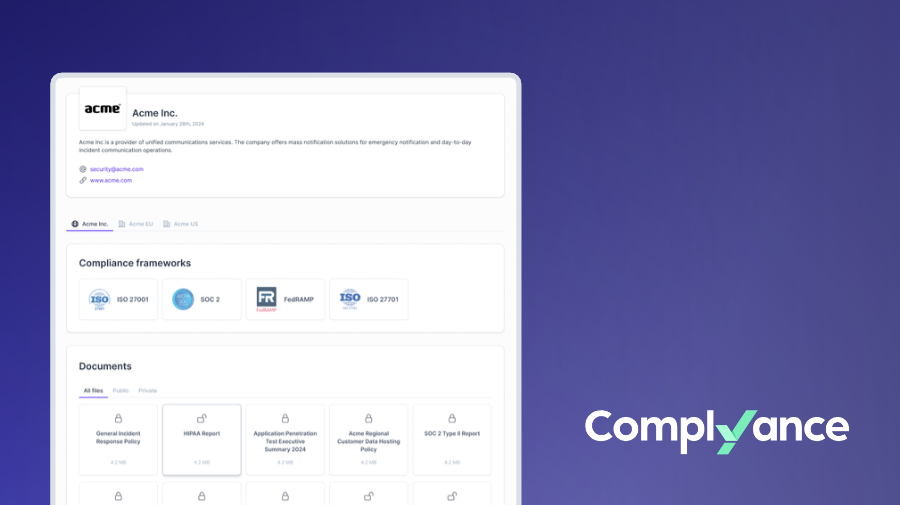
Complyance, an Enterprise GRC platform, is one example of this approach. Its Customer Trust module builds a trust portal from the controls and policies already in the platform and pairs it with AI drafting of answers to client security questionnaires, and your team reviews and approves each draft before it goes out.
Can a compliance or GRC platform help a software company pass Enterprise security reviews?
It can help by running the program a SOC 2 examination or ISO 27001 certification audit looks at: the controls, policies, and evidence. The report or certificate itself still comes from the auditor or an accredited certification body.
Where should you start?
Before choosing software, take the documents buyers asked for most in your last few reviews and check each one against what its control or policy says today.
Look at the date on the penetration test summary, the approval date on each policy you shared, and the answers your team reused most often. Whatever is out of date there would be out of date in any trust center, so it's the first thing to fix. Fixing it also tells you who owns each item before any software asks you to name an owner.
See how Complyance builds your trust portal and questionnaire drafts from the controls and policies your team already maintains. Book a Demo


